Knight Cat AI Video FAQ: Models, Credits, and Privacy
 Knight Cat AI Team
Direct answers to the knight cat AI video FAQ: which model renders the clip, photo versus text input, the 9:16 MP4 output, credit costs, privacy and refunds.
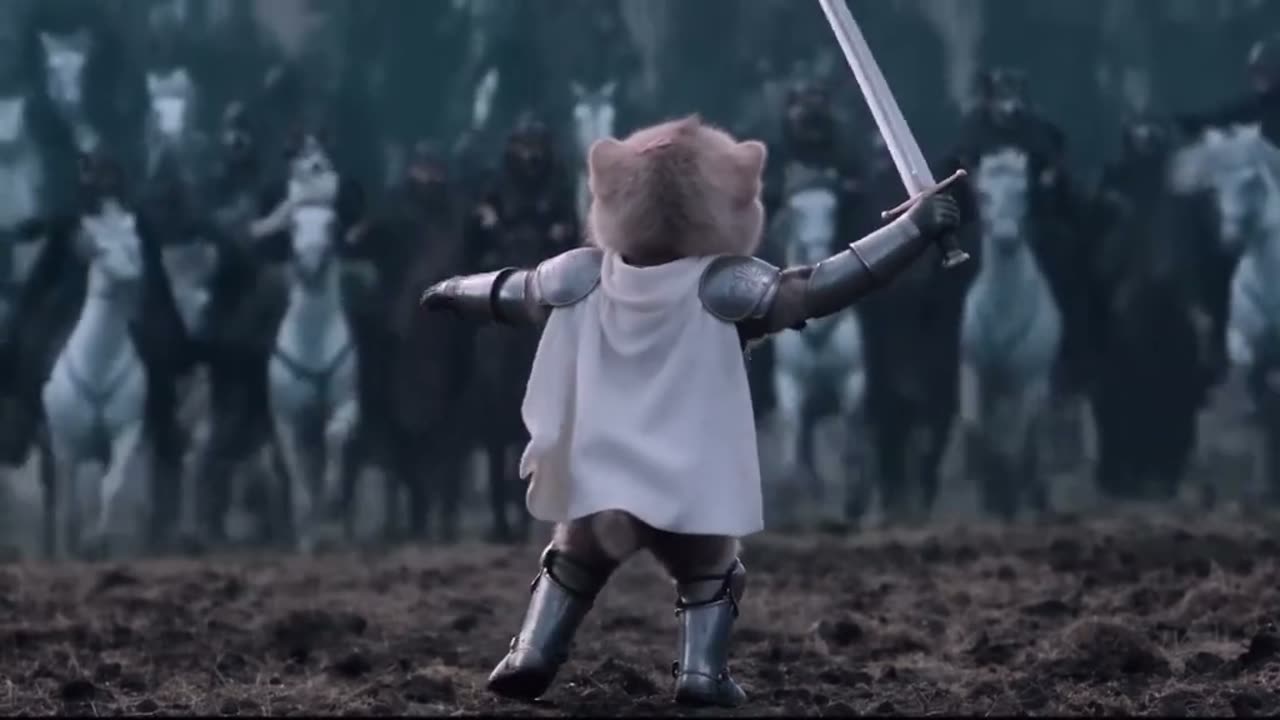
The knight cat AI video FAQ comes down to one line: Knight Cat AI runs on the Seedance 2.0 model, accepts either a single photo of your pet or a written scene description, and returns a private 9:16 MP4 of roughly ten seconds with no watermark, priced in credits that begin at 5 for a 480p render. Everything below expands that line into the specific answers people ask for before they press generate, covering the model, the input you should choose, the exact output file, how credits are granted and spent, who can see the result, and what happens when a render fails.
The five questions behind every other question
Almost all of the FAQ traffic on this site reduces to five decisions. Once you have answers to those, the remaining questions are variations on the same mechanics.
- Which model runs the render. Seedance 2.0, used as an image-conditioned video model. It generates motion from your reference photo plus a text description of the scene rather than assembling frames from a timeline.
- What you feed it. One reference photo of your cat or dog is the strongest input, because the photo pins the subject's fur pattern, face shape and markings. Text-only prompting is supported when you have no usable photo.
- What comes back out. A vertical 9:16 MP4 clip of about ten seconds, downloaded to your device. There is no public feed and no hosted player URL that other people can browse.
- What it costs. Credits per render, scaled by resolution and duration, with longer clips costing proportionally more.
- Who can see it. Only the account that created it. Renders stay private to your account unless you download and publish them yourself.
You can watch the whole loop in the studio on this page before reading the rest, which takes less time than reading the rest.
This clip: 30 credits · 6 clips a month for $39.90 (Pro), or 80 a year for $319
Credits at a glance
A render is priced by two variables: resolution and duration. Every tier scales linearly with duration and rounds up to the next whole credit, so a clip twice as long costs twice as many credits at the same resolution. The spec shown on the pricing cards is Standard · 720p · 12s, which is 10 credits. The default delivery spec is 1080p · 12s, which is 30 credits.
| Spec | Duration | Credits | | --------------------- | ------------------ | -------------------- | | 480p | 12s | 5 | | Standard · 720p | 12s | 10 | | Default · 1080p | 12s | 30 | | Any tier, longer clip | linear, rounded up | 720p at 24s costs 20 |
If you want the cheapest way to test whether a photo behaves, render at 480p first and move up only when the pose holds. The current card layout and any tier changes live on the pricing page, and the refund policy covers what happens to credits in the cases described further down.
How you get credits
There are two routes, and they grant different amounts.
- Google sign-in. Linking a Google account grants 30 credits once, at the moment the account is created.
- Email sign-up. An email account starts at 0 credits and grants nothing until you click the daily check-in inside settings. The check-in sequence pays 10, then 20, then 30, then 10 for each of the following four days, one claim per 24 hours.
Those numbers mean a new email account earns its first render only after the first check-in, while a Google account can render immediately. Neither route grants unlimited volume, and credits are spent in the order they were earned, so a check-in streak is the practical way to keep rendering without a purchase. The full walkthrough of a first render, including what to fix when the result looks wrong, is in the step-by-step guide.
Photo input versus text input
The difference is identity anchoring. When you upload a photo, the model receives a visual subject reference and uses it to hold the pet's markings and facial geometry stable while it changes wardrobe, lighting and setting. The cat in the output is recognisably your cat inside armor, not a generic knight-cat.
Text-to-video drops that anchor. You describe the scene instead, and the model invents the animal, so the result will be a convincing knight cat but not your specific pet. Choose photo input when the point of the clip is your animal, and text input when you want a scene, a breed, or a mood that no photo of yours covers.
A few input rules matter more than prompt wording:
- A clear, well-lit photo with the animal's face visible and an uncluttered background anchors best.
- One dominant action per shot renders cleanly. A prompt that asks for walking, turning and raising a paw in the same clip will smear or drop some of those actions.
- Extra limbs usually appear when the prompt implies a body pose the reference photo does not show, such as standing on hind legs, because the model has to guess the hidden geometry. A reference pose close to the action you want removes most of them.
- Camera language is a real parameter. A static, locked-off shot is more stable than a fast dolly or a wide push-in, so use movement deliberately rather than by default.
Preset choices interact with all of this. The four presets map to stormy_moor (Storm-swept moor), giant_protector (Tiny cat, giant knight), castle_gate (Castle gate at dusk) and milk_guardian (Guardian of the milk), and the quieter framing ones tolerate a weaker photo better than the dramatic two-figure shots. The generator overview explains each preset's camera behaviour in more depth.
Output, privacy, watermark and failed renders
The delivered file is an MP4 in 9:16 vertical framing, roughly ten seconds by default, sized for phone screens and short-form feeds. You download it directly; nothing is published to a public gallery, and no other account can browse your renders.
There is no watermark on any render, at any resolution or credit tier. The file you download is the clean clip.
Failed renders are refunded to the source balance. If a generation errors out, the credits return to the same balance they came from, so you can retry without losing the cost of the attempt. Credits granted by sign-in and credits granted by check-in both behave the same way for this purpose. If you would rather have the file on your phone or in a short-form editor next, the download guide covers where the MP4 lands and how to move it.
FAQ
Which model generates the knight cat video? Seedance 2.0. It is an image-conditioned video model, meaning it takes your reference photo as a subject anchor and generates motion from it plus the scene text you choose or write.
Do I need a photo, or can I type a prompt instead? Both work. A photo keeps your own pet recognisable through the costume and scene change. A text prompt generates a knight cat that is not tied to your animal, which is useful when you have no usable photo or want a breed you do not own.
What exactly do I receive? A 9:16 vertical MP4 of about ten seconds. You download the file from the studio; there is no public link or gallery page for it.
How many credits does one video cost? Against the 12-second baseline: 480p is 5 credits, Standard 720p is 10 credits, and default 1080p is 30 credits. Longer clips scale linearly at the same resolution and round up to the next whole credit.
How do I get credits without buying any? Sign in with Google for 30 credits once. If you sign up by email you start at 0 and earn through the daily check-in: 10 credits on the first claim, 20 on the second, 30 on the third, then 10 per day for the next four claims, one per 24 hours.
Is my video private? Yes. Renders are private to the account that created them and are not published to a public feed. Anyone who sees the clip sees it because you chose to share or post it.
Is there a watermark on the output? No. Renders carry no watermark at any resolution or credit tier, so the downloaded MP4 is the finished clip.
What happens if a render fails? The credits are refunded to the balance the render was charged against, so a failed attempt does not consume your credits. You can retry the same input afterward.
Why did my cat come back with an extra leg or an odd paw? Extra limbs appear when the prompt implies a pose the reference photo does not show and the model guesses the hidden geometry. Use a reference photo whose pose is close to the action you want, and keep the clip to one dominant motion.
Can I put two or three actions in one shot? It is not advisable. One action per shot is the reliable pattern; a clip that asks for several separate movements tends to smear or drop some of them because the model has to compromise across frames.
Which presets are the most forgiving? The quieter, locked-off framing presets. Shots that hold a stable pose with small ambient motion, such as a guard position in warm interior light or a static stone gateway, fail less often than the wide two-figure compositions.
Will the clip work on TikTok or Shorts? The 9:16 framing and roughly ten-second length match the common short-form format. The TikTok guide covers the posting flow, and the prompt guide covers writing scene direction that survives the format.
Where do I start if I have never rendered one? Open the home page and upload one clear photo, or read the step-by-step walkthrough first if you want the ordering of decisions explained before you spend credits. Support is reachable at contact@knightcatai.org for anything the FAQ does not cover.