Tiny Knight and Giant Protector: How Scale Wins Every Time
 Knight Cat AI Team
The tiny knight and giant protector preset explained: why scale contrast carries the shot, how a low camera sells it, and when it beats the other presets.
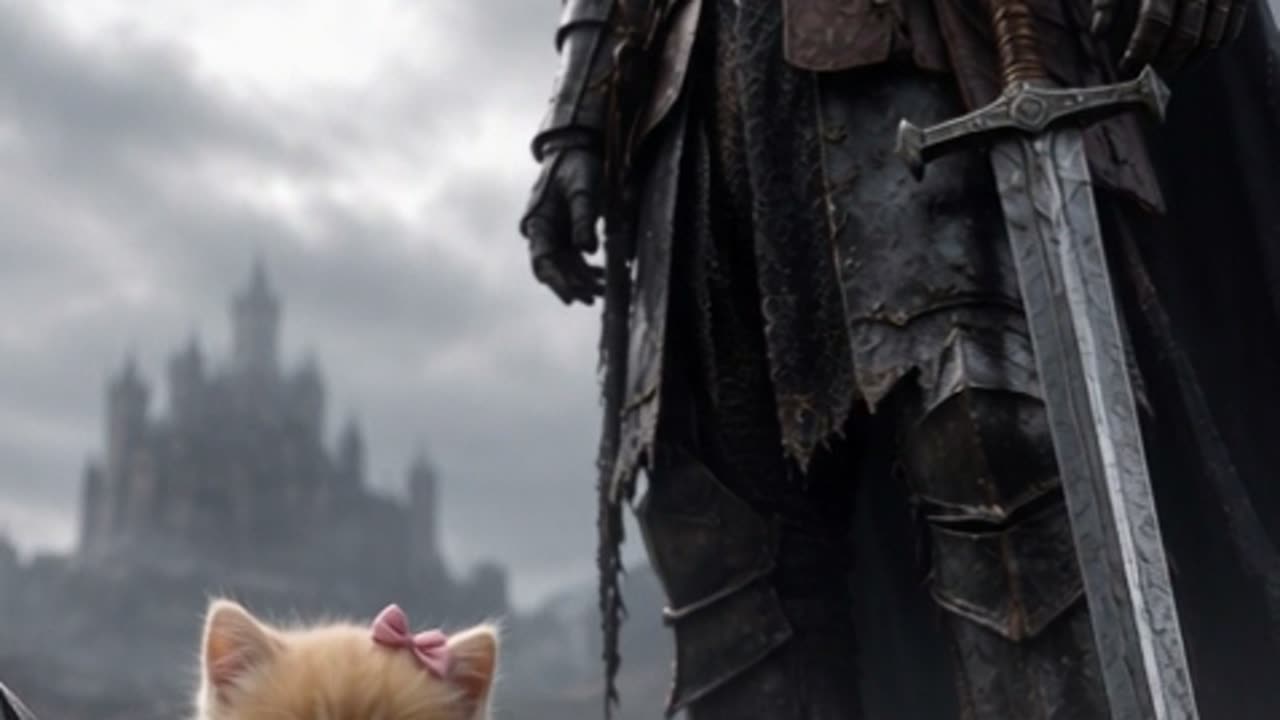
The tiny knight and giant protector preset is the studio option labelled Tiny cat, giant knight, and it renders your cat as a small armoured knight dwarfed by a second, much larger armoured figure standing in the same frame. Choose it when the size gap itself is the story you want told, rather than weather, architecture or a prop. Everything below explains what the preset builds, why the scale contrast has to be protected deliberately, and the specific jobs where it beats Storm-swept moor, Castle gate at dusk and Guardian of the milk.
What the preset actually renders
Two armoured figures, one visual language, two very different scales. Your cat becomes the small knight placed near the camera. Behind it stands an adult-proportioned knight in matching or complementary plate, and the Seedance 2.0 model has to hold both of them coherently inside a vertical 9:16 frame for roughly ten seconds.
That is a harder task than a single-subject preset, because two figures means two sets of anatomy to keep consistent and only one of them has reference evidence. The reference photo you upload supplies the cat. The giant knight is invented by the model from the preset description, so it will read as generic medieval plate rather than as anyone in particular. That is a deliberate trade: your pet keeps its identity, the protector stays anonymous.
Two mechanisms from the wider pipeline matter more here than anywhere else. Identity anchoring is what pins your cat's fur pattern, face shape, markings and ear set, so the animal survives being dressed in armour. Geometry supply is the opposite risk: the model only understands body shapes it can see, so any pose implied in the prompt that your photo does not show is a guess, and guesses produce extra limbs.
Why scale contrast is the core visual device
The device is not the armour. It is the ratio. A viewer reads "tiny" and "giant" from three cues: how much vertical frame each figure occupies, which figure is nearer the camera, and which one occludes the other.
Break any of those three and the composition collapses. If the giant is cropped at the shoulder, it stops reading as a giant and starts reading as a nearby person. If both figures sit on the same plane of depth, the model tends to normalise their sizes toward each other, and you get two knights of similar height. If your cat is placed at the back instead of the front, the perspective cue reverses and the small figure looks merely distant.
The preset handles a reasonable share of this on its own, but the framing you imply in the prompt is what decides the rest. Think of the shot as a two-character stage blocking problem: the small figure close and low, the large figure tall and just behind, both fully inside the vertical boundary.
This clip: 30 credits · 6 clips a month for $39.90 (Pro), or 80 a year for $319
The four presets compared
The studio offers four presets, and they are not interchangeable. Each one solves a different compositional problem, so the fastest way to pick is to name the problem first.
| Preset | What the model builds | Best use case | | ---------------------- | ------------------------------------------------ | ----------------------------------------------------- | | Storm-swept moor | Open landscape, wind, weather, one small figure | Motion and atmosphere carried by the environment | | Tiny cat, giant knight | Two figures at two scales, protector behind | A relationship between a small knight and a large one | | Castle gate at dusk | Architecture, a threshold, warm fading light | A sense of place and a destination | | Guardian of the milk | One figure plus a single prop, tight composition | A readable, quiet, prop-led shot |
The distinction matters because each preset spends its rendering budget differently. The moor spends it on weather simulation. The gate spends it on stonework and light. Guardian of the milk keeps the frame simple. Tiny cat, giant knight spends it on two consistent subjects, which is why it benefits most from a clean reference photo and a single action.
Framing: put the camera at cat height
The most reliable way to make the giant read as enormous is to place the camera low, near the floor, looking slightly upward. A low viewpoint compresses the distance to the standing figure and lets it extend toward the top of the frame, so it fills the vertical space instead of sitting politely in the middle of it. The same figure shot from eye level looks ordinary, and the same figure shot from above looks small.
Practical framing rules for this preset:
- Keep the cat in the lower third of the frame and closest to the camera, fully visible from nose to paws.
- Let the giant occupy the middle and upper frame, with the helmet inside the top border rather than cut off by it.
- Leave a narrow band of environment at the very top so the scale has something to be measured against.
- Avoid wide horizontal staging; the frame is 9:16 and the composition is vertical.
- Do not let the giant's arms cross in front of the cat's face.
If you want a direct comparison of how much prompt wording changes these shots, the patterns in knight cat AI video prompts transfer directly to this preset.
Keeping your cat recognizable next to a large armoured figure
A large bright subject beside a small one is a natural attention magnet, and the model can let the giant soak up detail that should belong to your cat. Three adjustments protect the identity anchor.
First, light the cat better than the giant. If the small figure sits in clean, soft light and the large one is slightly darker or backlit, the eye and the model both prioritise the cat's face.
Second, keep the helmet open. A closed visor on the small knight removes the ears, the face shape and the eye line, which are the strongest identity signals you have. An open helm with the cat's head clearly readable preserves most of the anchoring value of the upload.
Third, keep the fur pattern visible somewhere in the silhouette. Markings on the face and the top of the head are what survive a wardrobe change best. If your photo already works well for the general pipeline described in turn your cat into a knight, it will work here with no extra preparation.
Camera moves and one action per shot
This preset rewards restraint more than any other. Ask for one dominant motion and let the two-figure composition hold still.
A locked-off shot is the most stable choice. If you want movement, a slow push-in toward the pair, or a slight dolly that keeps both figures in frame, reads well. Camera language is a real parameter, not decoration, and contradictory instructions produce drift.
The action itself should be single and legible: the giant lowers a hand toward the cat, the cat looks up, the cat takes one step forward. Asking for a hand-lowering, a head-turn and a step in the same ten seconds will smear or drop at least one of them.
Pose guidance follows from the same logic. If your reference photo shows a seated cat, do not ask for a pose that implies hidden geometry, such as standing on hind legs. The model has no evidence for the underbody and will invent it, and invention is where duplicated paws and extra tails appear. Match the prompt pose to the photo pose and let the preset handle the armour.
Prompt lines that make the scale gap obvious
Short, structural additions work better than long descriptive passages. Lines that name relative size, depth order and viewpoint do the heavy lifting:
- "small knight in the lower foreground, huge armoured protector standing behind, low camera angle"
- "cat knight one third the height of the guardian knight"
- "protector fills the upper frame, helmet visible against the sky"
- "locked-off shot, slow push-in, single action"
Notice that none of these describe the cat's appearance. The upload already supplies that, and restating it competes with the reference rather than reinforcing it. The full generation flow, from upload to download, is described in the knight cat AI video generator overview.
When this preset beats the other three
Use Tiny cat, giant knight when the emotional content is a relationship rather than a location or an object. A small knight beside a large one communicates protection, escort, or companionship in a single still frame, before any motion happens. That is a stronger opening image than weather or masonry, and it holds up when the clip is viewed small on a phone.
Use Storm-swept moor instead when the mood you want is motion and exposure, and there is no second character. Use Castle gate at dusk when the destination is the point and you want architecture and warm light to carry the frame. Use Guardian of the milk when the shot needs to stay tight, quiet and prop-led, with everything readable at a glance.
If your goal is a single frozen moment that implies a story, this preset is the most efficient of the four at doing it. The scale gap does narrative work that the other three presets have to earn through environment instead.
Cost of iterating on this preset
Two-figure shots are harder, so plan on more than one attempt. Standard 720p at 12 seconds costs 10 credits, which is the number shown on the pricing cards, and the studio default of Standard 1080p at 12 seconds costs 30 credits. A 480p 12-second render costs 5 credits, and longer clips scale linearly and round up.
New accounts that sign in with Google receive 30 credits once. Email sign-up grants 0 until you complete the daily check-in, which pays 10, then 20, then 30, then 10 for four more days, one per 24 hours. Failed renders are refunded to the source balance, so a bad attempt is not a permanent loss, and nothing is published to a public feed. No render carries a watermark. Current credit packs are listed on the pricing page, and the studio itself is on the home page.
A sensible first pass on this preset is a 480p render to check the blocking, then a 720p or 1080p render once the composition holds.
FAQ
Is the giant knight my other pet? No. The preset builds one anonymous adult-scale armoured figure. Your uploaded photo anchors your cat, and only your cat.
Can I use a dog photo with this preset? Yes. The studio accepts one photo of a cat or a dog, and the same identity anchoring applies.
Why did my render give the cat extra legs? Almost always because the prompt implied a pose the reference photo did not show. Use a photo whose pose already matches what you want, and keep the action to one motion.
Do I need to describe the armour in the prompt? No. The preset defines the wardrobe. Spend your prompt words on scale, depth order and camera instead.