Knight Cat AI vs Pika: Dedicated Generator or General Platform?
Compare Knight Cat AI and Pika for turning one cat photo into a knight video: identity retention, clip length, credits, pricing, watermarking and who each tool suits.
 Knight Cat AI Team
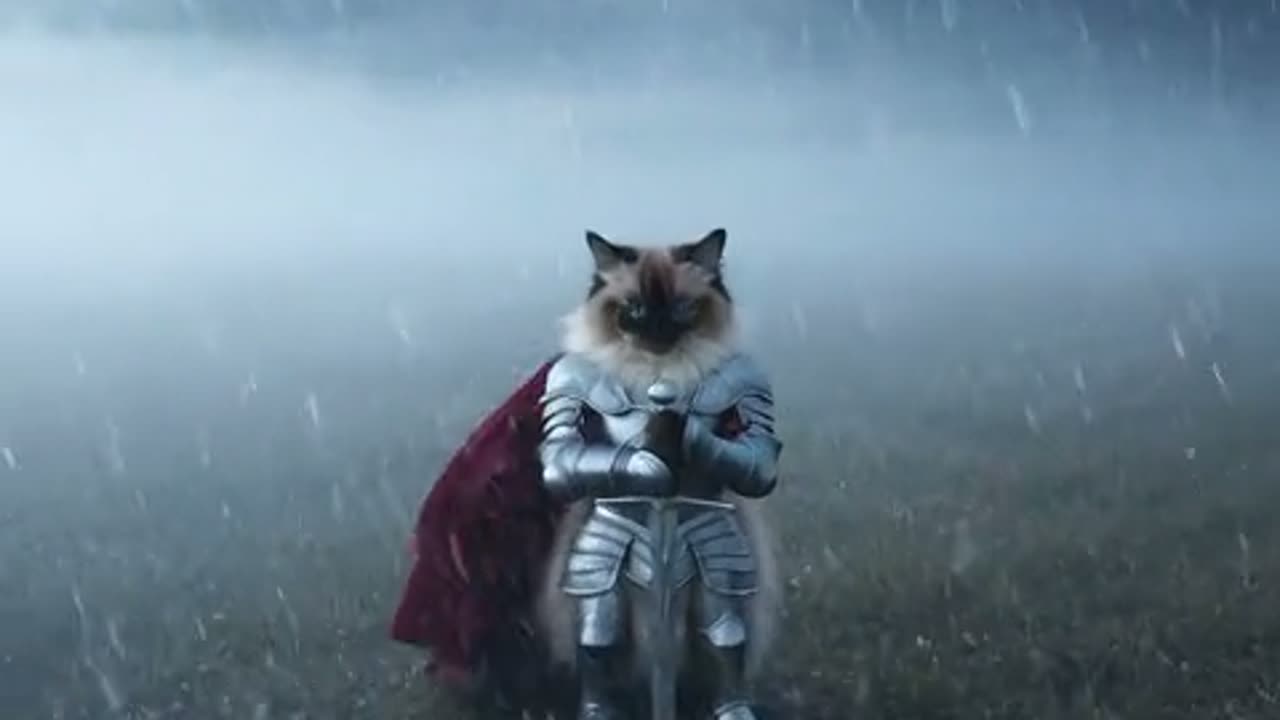
The knight-cat trend has a narrow, specific shape: one photo of your cat, twelve seconds of vertical video, and the animal rendered as a tiny armoured figure. Pika is the opposite kind of product. It is a general creative platform with many models, effects, a character studio and a timeline, and it can also animate a cat photo if you write the prompt yourself.
That difference decides most of the buying decision. This comparison uses Knight Cat AI's published product configuration and Pika's public pricing and FAQ pages, all checked on 21 October 2026. It separates what each product documents from what it leaves to the model, and it shows the cost arithmetic instead of asking you to trust a headline.
Quick verdict
| Question | Knight Cat AI | Pika | | ---------------------- | ------------------------------------------ | ------------------------------------------------------------------------------------ | | Best for | One cat photo into an armoured knight clip | A general AI video and image platform | | Core workflow | Upload a photo, choose a preset, render | Choose a model, write a prompt, generate | | Knight-cat preset | Yes, the product is built around it | No; you supply the prompt and look | | Native clip length | 5, 8, 10 or 12 seconds | 5 seconds on most models; 5 or 10 seconds on Pika 2.2 | | Aspect ratios | 9:16, 16:9, 1:1 | Depends on the model and project | | Entry cost | $9.90 one-time for 10 credits | Free plan with 0 monthly credits; Starter $10/month for 900 credits | | Credits expire? | One-time packs do not expire | Plan credits do not roll over; top-ups last 365 days | | Watermark | No watermark on renders | Pricing page says watermark-free; FAQ says shared links are watermarked on all tiers | | Commercial rights | Sold as credits for your projects | Commercial rights marked on Creator and above | | Free first render | No | Free plan, but no monthly credits | | Learning curve | Low: one upload and a preset | Moderate: model choice, prompt, project setup |
The one-line version: Knight Cat AI is a product with a prompt already written for you, and Pika is a workshop where you write it yourself.
What Knight Cat AI actually is
Knight Cat AI turns one photo of a cat or dog into a short vertical clip of that animal as a tiny armoured knight. The pipeline is image-to-video on Seedance 2.0, served through kie.ai and moderated before submission. You upload a reference photo, choose one of four studio presets, and the model renders the armour, the setting and the motion around the animal you uploaded.
The published specifications matter because they are unusually concrete:
- Duration: five, eight, ten or twelve seconds.
- Resolution: 480p, 720p or 1080p.
- Aspect ratio: 9:16, 16:9 or 1:1.
- Credit cost per twelve-second clip: 5 credits at 480p, 10 at 720p, 30 at 1080p. Shorter clips scale linearly and round up.
- Default: 1080p, twelve seconds, 9:16, which costs 30 credits.
- Watermark: none on the render.
- Failed renders: refunded to the source credit balance.
There are no free credits. The smallest purchase is the Single pack at $9.90 for 10 credits, which is exactly one standard 720p twelve-second video. Larger one-time packs lower the effective price: Duo is $19.90 for 30 credits, Party is $39.90 for 100, Crew is $79.90 for 250 and Studio is $149 for 600. Monthly plans start at $9.90 for 20 credits and reach $79.90 for 500; yearly plans discount the same tiers.
The product is deliberately narrow. It is not a timeline, it does not add music, and it does not offer a library of unrelated effects. It does one transformation and prices it by resolution and duration.
What Pika actually is
Pika is a general AI creative platform. Its public site describes a Video Studio that creates "anything from a short clip to a 30-second multi-shot masterpiece," a Character Studio for a reusable character, and tools such as Swap Anything, Motion Transfer, Extend Video and Color Grade. Its plans include access to all models, and the pricing page quotes per-generation costs for models such as Seedance 2.5 and Wan 3.0.
Pika's image-to-video specifics are documented in its FAQ rather than on the pricing page: Pika 2.2 image-to-video can be five or ten seconds at 720p or 1080p, while "all other models and features have 5 seconds long generations." Its FAQ also states that monthly video credits do not carry over, that paid top-up credits never expire, and that cancellations receive no pro-rated refund.
On rights and marks, the public pages are not perfectly aligned. The pricing page marks commercial rights from the Creator tier and describes the plans as watermark-free; the FAQ says Pro and Fancy can be used commercially, that Pro and Fancy downloads are watermark-free, and that shared links carry a watermark on every tier. The tier names appear to have changed between the two pages. Treat both statements as a reason to confirm the current terms in your account before publishing a paid campaign.
None of that is a flaw specific to Pika; it is what a fast-moving platform looks like from the outside. It does mean that a comparison has to quote both pages and their access date rather than present one sentence as permanent.
Identity retention: the only question that matters for a knight cat
A knight-cat clip succeeds or fails on one property: the viewer must recognise the cat. The armour is generated, the setting is generated, and the motion is generated, so the fur pattern, face shape and ear markings are the only anchor back to the animal you actually own. If those drift, the clip becomes a generic cat in armour and the premise collapses.
Knight Cat AI is built around that anchor. The reference photo is the input, the model is instructed to preserve the animal, and the product's presets assume one subject. The failure modes are predictable: a dark, blurry or heavily filtered photo gives the model less identity to hold; a group photo gives it more than one candidate; a fast action with several beats gives it more to solve than a twelve-second render can carry. The site's own guidance is to use a clear, front-facing photo and one dominant action per clip.
Pika can animate a reference image as well, and Character Studio is designed to keep a reusable character consistent across creations. That is a different mechanism: it is a character you define and reuse, not a one-photo identity transfer aimed at a single armoured look. For a series with the same fictional cat, Character Studio is genuinely useful. For "this is my cat, make it a knight once," the dedicated workflow is the shorter path.
Clip length and framing
The two products disagree about what a "clip" is.
Knight Cat AI renders up to twelve seconds and exposes the duration as a choice: 5, 8, 10 or 12 seconds, with the credit cost scaling linearly. It also exposes the aspect ratio, including native vertical 9:16 for TikTok, Reels and Shorts. For the knight-cat format, a twelve-second vertical frame is the product, not an afterthought.
Pika's documented image-to-video lengths are five or ten seconds on Pika 2.2 and five seconds on other models, though its Video Studio advertises multi-shot projects up to 30 seconds. That longer project is assembled from multiple generations rather than produced as one continuous twelve-second render. If you want a single unbroken shot of a cat walking through a gate, that distinction matters.
Cost compared: per clip and per second
Headline plan prices are a poor way to compare these two, because they meter differently and sell different things. The useful comparison is the cost of the clip you actually want.
| Cost item | Knight Cat AI | Pika | | ------------------------ | ------------------------------------------ | --------------------------------------------------------------------------- | | Free tier | None; first render is paid | Free plan with 0 monthly credits | | Smallest purchase | $9.90 one-time, 10 credits | $10/month Starter, 900 credits | | 720p twelve-second clip | 10 credits | Not a documented single-generation length on most models | | 1080p twelve-second clip | 30 credits | Pika 2.2 supports 1080p at 5 or 10 seconds; credits not listed per clip | | Per-second cost at 720p | About $0.17 at the $39.90 monthly Pro tier | About $0.27 for Seedance 2.5 720p 5s at 122 credits on the $10 Starter tier | | Credit expiry | One-time packs do not expire | Plan credits do not roll over; top-ups expire after 365 days | | Refund on failed render | Yes, back to the credit balance | Not documented on the public pages |
The arithmetic behind the per-second row is worth showing:
- Knight Cat AI: 10 credits for a twelve-second 720p clip. The monthly Pro plan is $39.90 for 200 credits, or about $0.20 per credit, so the clip costs about $2.00, or $0.17 per second.
- Pika: Seedance 2.5 at 720p for five seconds costs 122 credits. The Starter plan is $10 for 900 credits, or about $0.0111 per credit, so the clip costs about $1.36, or $0.27 per second.
Two honest caveats. First, Pika's five-second example is a different model generation from Knight Cat AI's Seedance 2.0, so a lower price per second does not mean lower quality or higher quality; it means a different model at a different price. Second, Pika's credits are bundled into a subscription, so the effective cost falls if you use the rest of the platform, and rises if you subscribe for one clip and stop.
For a single family project, the Knight Cat AI Single pack is $9.90 for one 720p twelve-second clip. For someone who already edits video weekly, Pika's Starter plan may be the better home for the same money because it covers the edit as well.
Watermarks, rights and publishing
Knight Cat AI states that renders carry no watermark and that failed renders are refunded. It sells credits rather than a license, so your rights to publish depend on the source photo, the terms of service and the platform you post to.
Pika's public pages are less settled. The pricing page describes the plans as watermark-free and marks commercial rights from Creator upward; the FAQ says Pro and Fancy are the commercial tiers and that shared links carry a watermark for every tier. Both pages were live on 21 October 2026. If a paid campaign depends on the answer, confirm it in the account before you buy, and keep a screenshot of the term you relied on.
For either tool, the non-negotiable rule is the same: only upload a photo you have the right to use, and think about whether the animal or its owner can be identified before you publish.
Who each tool is for
Knight Cat AI is for you if:
- You have one clear photo of your cat and want the knight look.
- You want a native vertical clip of up to twelve seconds.
- You want the credit cost visible before you render.
- You prefer a one-time pack to a subscription.
- You do not want to write a prompt or choose a model.
Knight Cat AI is not for you if:
- You need many models, effects or motion transfer.
- You need a 30-second multi-shot edit.
- You want a free first generation; free credits are disabled.
- You need a specific armour design from a film or game; the armour is generated, not licensed from a franchise.
Pika is for you if:
- You want one platform for video, image, effects and character work.
- You need a reusable character across several projects.
- You want a free plan to explore the interface.
- You need a documented commercial tier for client work.
Pika is not for you if:
- You want the knight-cat look without writing a prompt.
- You want a single twelve-second render with a fixed, predictable credit price.
- You need a one-time purchase rather than a subscription.
- You need the public commercial and watermark terms to agree before you commit.
Three scenarios
"I have one photo and want the knight-cat clip from TikTok." Start with Knight Cat AI. Upload the photo, choose 720p for a cheap first draft, inspect the face at the end, then re-render at 1080p if it holds.
"I run a pet brand and need a reusable mascot across a campaign." Start with Pika's Character Studio, or use Knight Cat AI for the hero knight shot and a general editor for the rest. The reusable-character workflow is the reason to pay for a platform.
"I want to try several AI video tools before spending anything." Pika's free plan is the lower-risk test, but it includes zero monthly credits, so the free tier mostly buys interface access rather than generations. Knight Cat AI has no free tier at all; its cheapest real test is the $9.90 Single pack.
FAQ
Can Pika make a knight cat video?
Pika accepts image-to-video jobs and includes several video models, so it can animate a cat photo. It does not ship a knight-cat preset, armour prompt or fixed vertical knight scene; you supply the prompt and the model does a general image-to-video pass. Knight Cat AI supplies the armour look and the twelve-second vertical frame as a product preset.
Is Knight Cat AI cheaper than Pika?
Per second of 720p video, Knight Cat AI is cheaper at its monthly Pro tier: ten credits for a twelve-second clip works out to about two dollars at the $39.90 Pro plan, while Pika prices Seedance 2.5 at 122 credits for a five-second 720p clip, about $1.36 on its $10 Starter plan. That is roughly $0.17 per second for Knight Cat AI against $0.27 per second for Pika, before any subscription discount. The models are different generations, so treat this as a budget comparison, not a quality verdict.
Does Knight Cat AI have a free trial?
No. Free credits are disabled on Knight Cat AI, so the first render is paid. The smallest entry is the Single pack: $9.90 for ten credits, which is one standard 720p twelve-second video. Pika has a free plan, but it includes zero monthly credits, so free generations are limited to top-ups or promotions.
Which tool keeps the cat recognisable?
Knight Cat AI anchors identity to the uploaded reference photo and renders the armour around the animal, which is the core of its product. Pika can animate a reference image too, and its Character Studio keeps a reusable character consistent across projects, but neither tool guarantees an identical face in every frame. Generate a short draft and inspect the final second before spending more credits.
Can I use the result commercially?
Knight Cat AI does not watermark its renders and sells credits for personal or commercial projects under its terms. Pika marks commercial rights on its Creator tier and above on the pricing page; its FAQ uses older tier names, so confirm the current commercial term at checkout. In both cases you must own or have permission to use the source photo.
How long are the clips?
Knight Cat AI offers five, eight, ten and twelve second durations at 480p, 720p or 1080p, with 9:16, 16:9 and 1:1 aspect ratios. Pika states that Pika 2.2 image-to-video can be five or ten seconds at 720p or 1080p, while other models produce five-second generations. Check the model card before you plan a longer cut.
Do I need a subscription?
No for Knight Cat AI: five one-time credit packs start at $9.90, and those credits do not expire. Pika subscriptions refresh credits monthly and those plan credits do not roll over; its paid top-up credits are the part that carries forward.
Which one should I choose?
Choose Knight Cat AI when the job is one photo of your cat, one armoured look, one vertical twelve-second clip and a predictable credit cost. Choose Pika when you need a general creative platform: many models, reusable characters, effects, motion transfer, longer multi-shot edits and a commercial tier. They can also be used together, with Knight Cat AI producing the hero clip and a general editor handling the rest.
Sources
- Knight Cat AI product catalog and rendering rules in this site's public repository, checked 21 October 2026: 5, 8, 10 and 12 second durations; 480p, 720p and 1080p; 5, 10 and 30 credits per twelve-second clip; one-time and subscription credit packs; no free credits; failed renders refunded.
- Pika pricing page, https://pika.art/pricing — accessed 21 October 2026. Lists Free, Starter, Creator and Fancy plans, credit allowances, commercial rights from Creator, and per-generation costs including Seedance 2.5 at 122 credits for 720p/5s and Wan 3.0 at 33 credits.
- Pika FAQ, https://pika.art/faq — accessed 21 October 2026. States Pika 2.2 image-to-video is 5 or 10 seconds at 720p or 1080p, other models are 5 seconds, monthly credits do not carry over, top-ups never expire, and shared links carry a watermark.
- Pika home page, https://pika.art/ — accessed 21 October 2026. Describes Video Studio, Character Studio, Swap Anything, Motion Transfer, Extend Video and Color Grade.
Clip lengths, plan terms and model availability change. Re-check the linked pages and the in-account terms before you buy; the per-second figures here are worked examples from the access date, not standing quotes.
Knight Cat AI Team
Knight Cat AI turns one cat photo into a tiny armoured knight video. An independent tool, not affiliated with any film, game or franchise.